Online Railway Ticket Reservation System
Uzma Khan
8th August 2024
Online Railway ticket reservation is very useful nowadays. This is very important to design a good-working system software for ticket booking and related transactions. To design it, full-track documentation of models (ER, DFD, Class, Use-case, Activity, Sequence) is required as per as software development is concerned.
Features of the System:
The Reservation system should contain the following features:
- If a passenger wants to reserve ticket(s), firstly, he/she has to log in to the Railway system with valid credentials. Then, the passenger has to provide his/her details with the date of the journey, names of the passengers and their details, origin station details, destination station details, and the class type of the required ticket(s).
- The Railway Reservation System will provide the available Train-list, and Seat-availability, via-details.
- To book a ticket passengers can pay through online/offline mode. After successful payment of the ticket fare the System will generate the ticket and PNR no. will be given to the passenger. The System also keeps the payment details and sends them to the system Admin.
- The Passenger can check PNR status (confirmed, RAC, waiting list) by entering the PNR no. into the Reservation system.
- The Reservation system should store all train details, fare details (by zone, class, and date wise), PNR no, date of trains, etc. This maintenance should be controlled by the Admin.
- The System also has refund rules which have a date of reservation, ticket fare, and refundable percentage. The passenger can simply cancel the ticket(s) by entering the PNR no and a cancel ticket request. After cancelation, the Admin will pass the refundable amount to the System and the System will give the refundable amount to the passenger.
Required Diagrams:
Entity Relationship(ER) Diagram:
ER diagram displays the relations between the various entities (classes and their attributes) stored in the database. ER diagrams are very important for any database project. This diagram shows the communication between entities and their attributes.
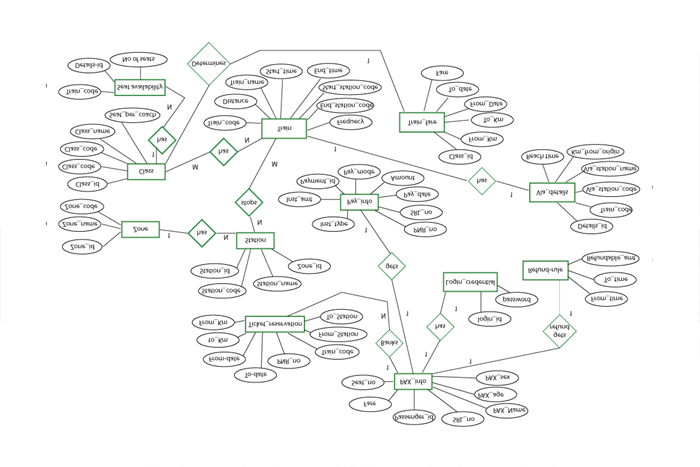
The above ER diagram illustrates the key information about the railway reservation system, including entities like PAX_info, Login_credentials, Ticket_reservation, refund_rule, via_details, train_fare, Train, Seat_availability, Class, Zone, station, pay_info. This diagram also shows the relationships between entities.
Entities and their attributes are:
PAX_info: Attributes of PAX_info entity are Passenger_id (primarykey) ,SRL_no ,PAX_name ,PAX_age ,PAX_sex ,fare,seat_no.
- Login credentials: Attributes of Login_credentials entity are login_id(PK) , password.
- Ticket reservation: Attributes of Ticket_reservation entity are PNR_no(pk),to-date, from-date, to-km, from-km, to-station, from-station, Train_code.
- Refund rule: Attributes of refund_rule entity are to-time, from-time, refundable-amt.
- Via details: Attributes of via details entity are Details_id(PK), Train_code, via_station_code, km_from_origin, Reach_time.
- Train fare: Attributes of train_fare entity are to-date, from-date, to-km, from-km, Fare, Class_id.
- Train: Attributes of Train entity are Train_code(PK), Distance, Train_name, Start_time, End_time, Start station code, End station code, Frequency.
- Seat availability: Attributes of Seat_availability entity are Train_code, Class_code, and Number of seats.
- Class: Attributes of Class entity are Class_id(PK), coach_prefix, class_code, Class_name, seat_per_coach.
- Zone: Attributes of Zone entity are zone_id(PK), Zone_name,Zone_code.
- Station: Attributes of station entity are Station_id(PK),Station_code,station_name, zone_id.
- Pay info: Attributes of Pay_info entity are payment_id(PK), pay_mode, amount, pay_date, srl-no, PNR_no, inst_type, inst_amt.
Relationships between Entities:
- One-to-one relation: PAX_info to login_credentials , PAX_info to refund_rule, Train to Via_details, Class to train_fare, PAX_info to pay_info.
- Many-to-one relation: PAX_info to ticket_reservation, Zone to the station, Class to seat_availability.
- Many-to-many: Train to the station, Train to class.
Data-Flow Diagram(DFD):
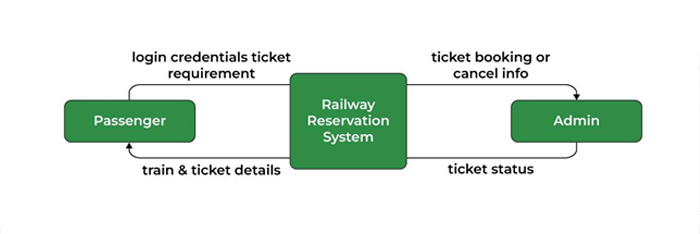
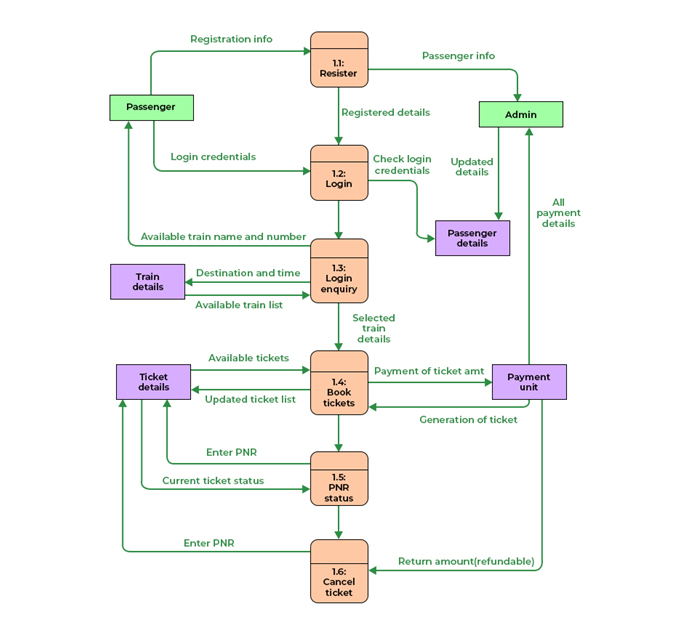
This diagram represents various operations by dataflow movement.
- Level 0 DFD:
- Level 1 DFD:
Class Diagram:
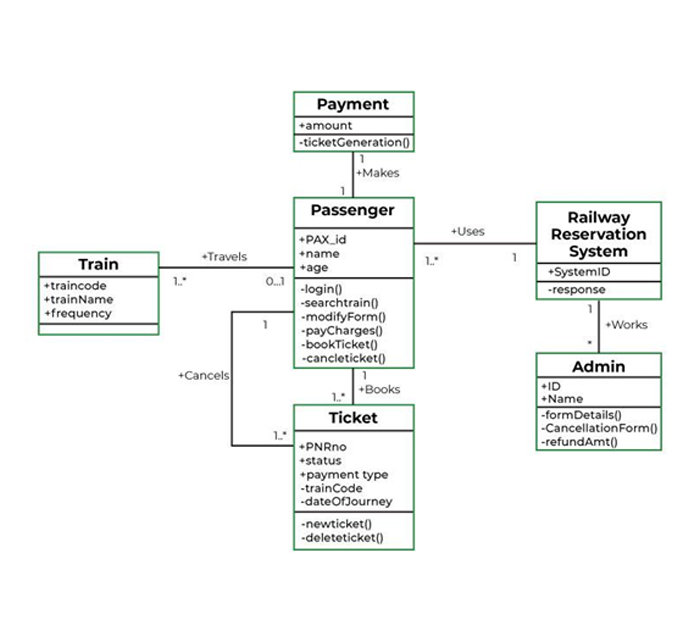
These diagrams describe the operation and attributes of a class with imposed constraints in the system. In this article, the classes to be considered are ‘payment’, ‘train’, ‘passenger’, ‘ticket’, ‘railway reservation system’, ‘admin’. The description of the classes is given below.
|
Class |
Attributes |
Processes |
|
Payment |
amount |
Ticket Generation |
|
Train |
train code, train name, frequency |
— |
|
passenger |
PAX id, name,age,sex |
login, search Train, modify the form, pay charges, book tickets now ticket, cancel tickets |
|
ticket |
PNR_no, status, payment type, train code search train, date of journey |
new Ticket, delete tickets |
|
railway reservation system |
system |
response |
|
Admin |
ID, name |
Form Details, cancellation Form, Refund Amount |
Use-Case Diagram:
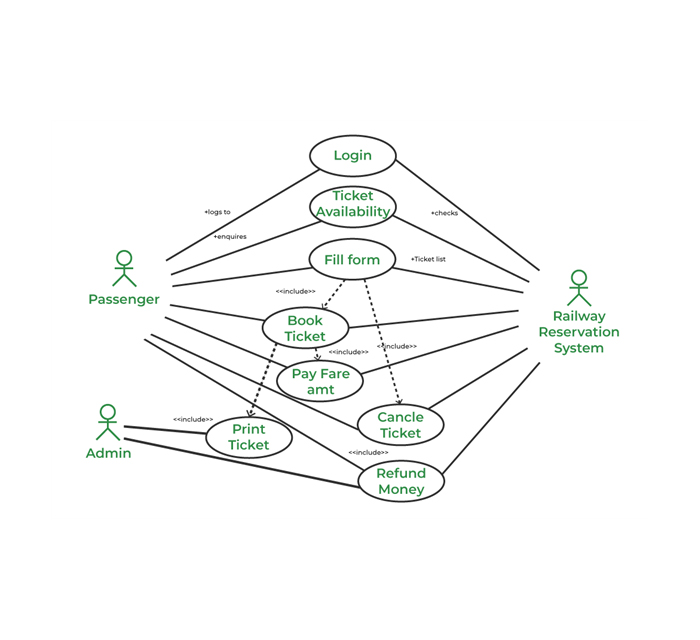
By using use case diagrams, the interactions between a system and the users within that system will be represented.
Use-Case Descriptions:
The relationship between the actors and the use cases of the online Railway reservation system is given below–>
- Passenger Entity: Use cases of passengers are login, ticket availability, Filling the form, Book ticket, Canceling ticket, and Refund money.
- Railway Reservation System: Use cases of the Railway Reservation System are login, ticket availability, Fill the form, Book ticket, Cancel ticket, and Refunding money.
- Admin: use cases of Admin are Print ticket, refund money. Admin also controls the whole Railway Reservation System in different cases.
Activity Diagram:
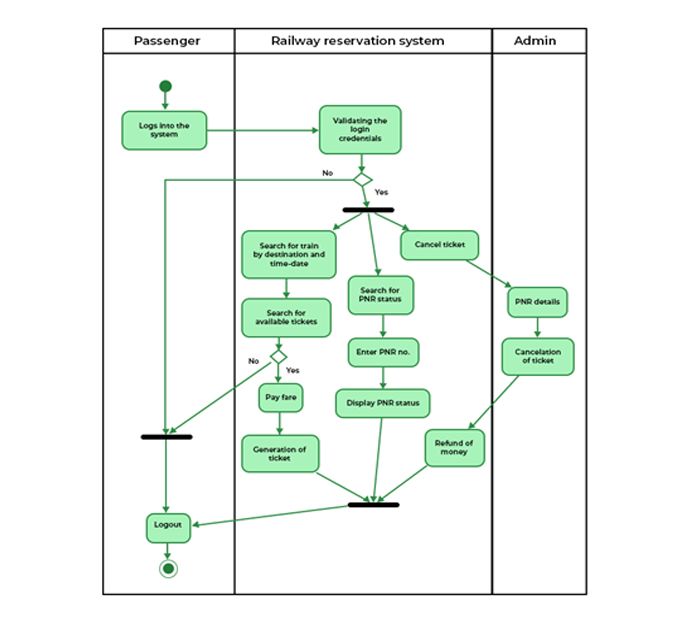
This diagram shows the flow of processes from one to another activity.
Sequence Diagram:
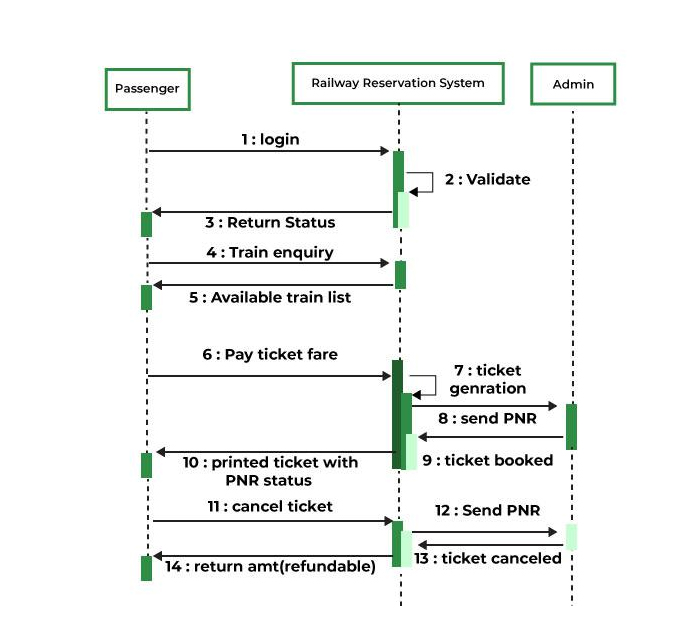
This diagram shows how and in which order a group of objects works together in a system. This is an interactive diagram and this is mostly used by software developers.
Views (33)
Comments (0)
Duration (0)




.jpeg)


 Facebook
 Instagram
 WhatsApp
 Linked in
 Twitter
 Reddit
Comments (0)
Write a Comment